Building a homelab I can trust
I’ve been setting up a homelab, and I’m excited about how much I can do with it. My photos, documents, and home automation are becoming services I can run and understand myself. There’s a particular satisfaction in getting something useful working on hardware I control, then figuring out how to make it reliable enough to use every day.
The appeal goes beyond installing applications. I like seeing how the pieces fit together: how a request reaches a service, where the data lives, and what happens when a dependency disappears. Self-hosting makes those questions very concrete. If something breaks, I get to understand why.
It also means taking responsibility for the security of the system. These services handle personal data, so I’ve put serious work into the boundaries around them.
Separating the network
My lab doesn’t sit on one flat network with every other device in the house. I’ve separated servers, storage, IoT devices, and guests into different network segments, with firewall rules controlling the connections between them. Guests get internet access without access to the local networks. Administrative access is restricted to the networks that need it.
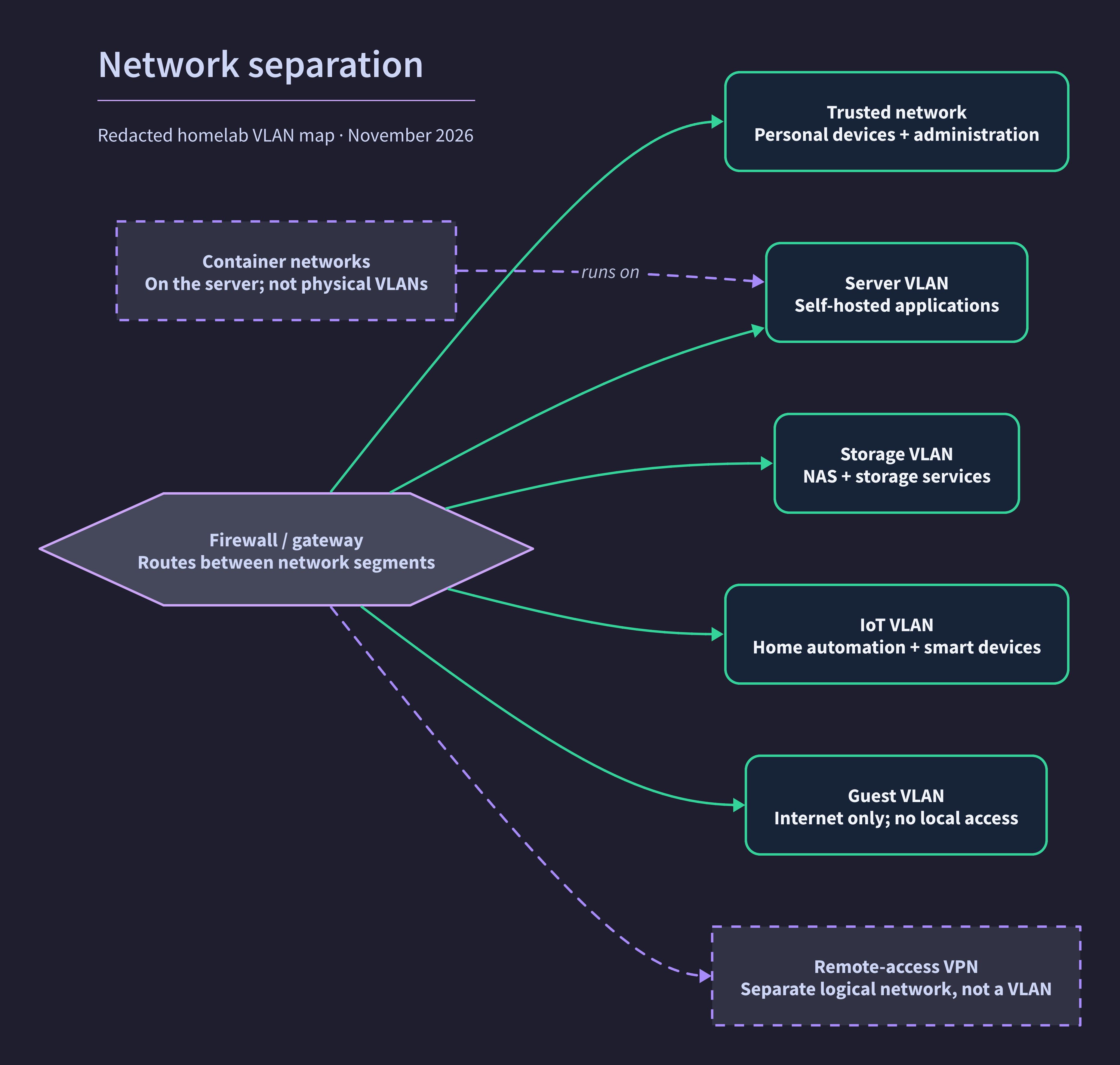
I’ve also worked on the host firewalls and the rules around container traffic. One detail worth learning early: Docker can publish a port through a packet path that bypasses the host firewall’s usual incoming rules. A reassuring firewall status isn’t enough. I’ve added explicit filtering for published container ports and tested allowed and blocked traffic through the actual forwarding path.
That kind of test is satisfying in its own right. I want evidence that a boundary works, not just a configuration file that looks reasonable.
Being deliberate about access
For private browser-based services, I use an identity-aware access layer with passkey authentication. Those applications require my identity before a request reaches the application’s own login. Where practical, services stay on internal container networks or bind only to the local host instead of publishing a port on every interface.
There are deliberate exceptions for applications whose mobile or device clients can’t complete a browser-based sign-in. Those still rely on their own authentication, with an additional rate limit on selected login requests. I’m treating compatibility as something to test per application, rather than assuming one access policy will work everywhere.
Automation has separate credentials for the APIs it needs. Making a script work shouldn’t require removing the access gate for everyone else.
Reducing what a service can do
I’ve hardened the main server’s container stack by dropping default Linux capabilities, adding back only those a service needs, and preventing processes from gaining new privileges. I run services as non-root where their images support it. On the storage side, I’ve also restricted the dashboard’s Docker API access to read-only operations.
These controls don’t make a vulnerable application harmless. They reduce the authority it starts with and help limit what can go wrong. I keep the deployment configuration in Compose so those decisions survive a rebuild.
Checking the work
The quieter parts of this project matter just as much as the applications. I’ve set up health monitoring and failure alerts, documented the infrastructure, and added checks for configuration drift. I’ve also tested restoring the photo database into a separate database and compared its contents with the live system. That’s evidence for that restore procedure, not a claim that every recovery scenario is solved.
I don’t consider security finished. As I add services, I need to check their permissions and access paths, and keep testing recovery rather than assuming a successful backup job answers every question.
That’s part of why I’m enjoying the lab so much. I can try new software and learn by using it, while doing the engineering needed to trust it with something more important than test data. I’m looking forward to writing more about what I build and what I learn along the way.